
File Delivery instructions.
AAF/OMF Prep
Before you export the AAF there are a few things you need to do to prepare your session:
Add a burnt in timecode(BITC) to your video Add a sync pip at the start and end of you sequence. This should be a one frame 1kHz audio tone placed exactly 2 second before the first frame of action and exactly 2 seconds after the last frame of action. This will help us to see and hear if anything slips in the transfer process so we can quickly sync it back up.
Label everything and organise your audio tracks in a logical order i.e:
1-10: Dialogue
11-16: Production Audio
17-20: SFX
21-25: Music Ensure any clips with effects on them have been rendered. Please leave the original clips on a separate track below the processed version(labelled appropriately).
Video

When exporting the Quicktime reference video please note the following:
Ensure it has a burnt in timecode(BITC) Encoded with the Avid DNxHD or ProRes Proxy codec.
Set resolution to 1920×1080
Include the audio mix from your NTL in the reference video
AUDIO
24 bit
48 kHz
.wav or .aif file
AAF/OMF Prep

Export timeline as either an OMF or AAF* file
AAF Preferred*
Embed audio Include at least 48 frame handles
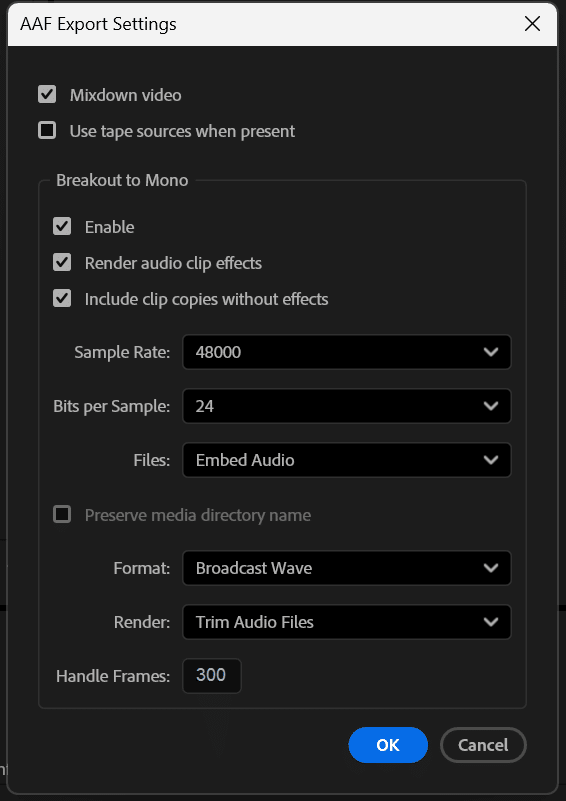
PREMIERE
If you’ve applied effects to your audio and want us to have them, check both the “Render audio clip effects” and “Include clip copies without effects”. If you’ve applied no effects, these two checkboxes are not necessary.
Multiply your project frame rate by five to get five seconds of handle frames. You must round to the nearest whole number.
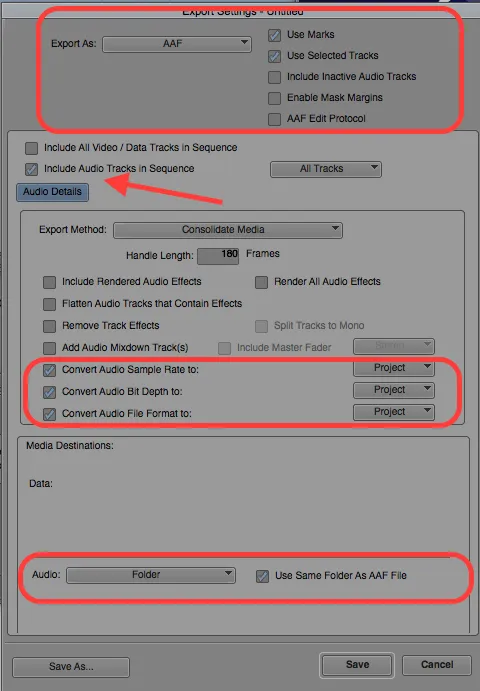
MEDIA COMPOSER (AVID)
• “Add Audio Mixdown to:” is not required but suggested.
• Multiply your project frame rate by five to get five seconds of handle frames. You must round to the nearest whole number.
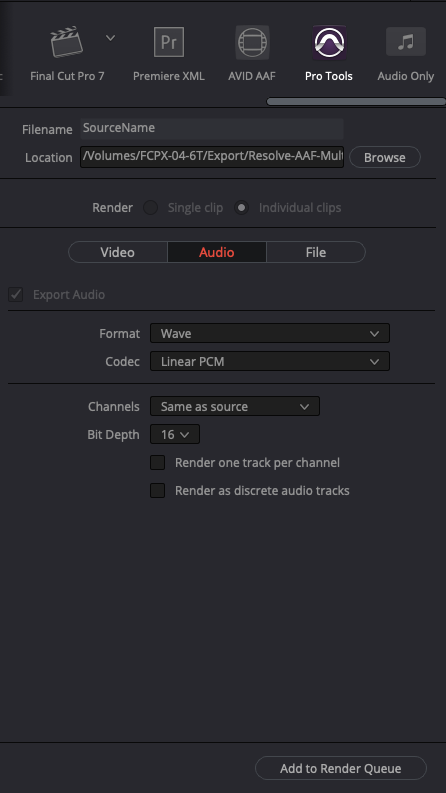
DAVINCI RESOLVE
• Davinci Resolve only exports referenced .AAF’s. Please send us all files the program exports to your selected folder, not just the .AAF file.
• There is no way to set handles for Protools .AAF in Davinci Resolve. If needed, we may ask for additional raw audio files or all location sound.
• Davinci Resolve does not export .OMF files.
Please contact us with any questions.